
💲 Importing Application Payment Activities
Summary
You cannot import data to the
[payment]table in Slate via Upload Dataset , but you can import payment activities into[activity]. You can referencing existing activities to see how the fields should map.
| Payment Activity Field |
Import Destination |
Sample Values |
| User |
Activity: User |
wbest |
| Activity: Code |
PAYMENT |
|
| Date |
Activity: Date |
2022-06-06T10:27:32 Eastern Time Zone |
| Payment Type and Amount |
Activity: Subject |
Must be formatted correctly:
|
| Payment Account |
Activity: Public Comments |
etc. |
| Expires Date |
Unknown | |
| Private Comments |
Activity: Private Comments |
|
Never create subcodes for the built-in PAYMENT activity code. Slate will break in interesting ways.
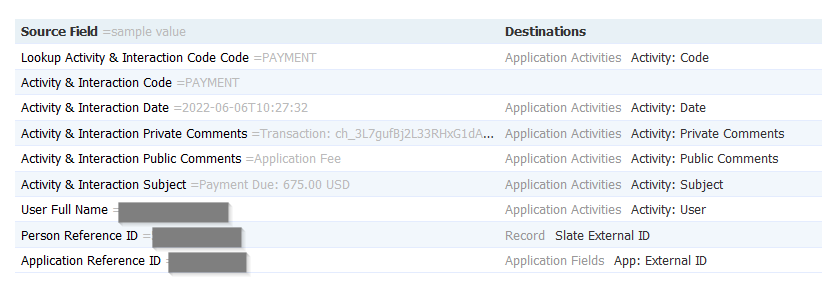
Map Application Activities: Prevent Duplication to No or else multiple payments of the same dollar amount and date will be de-duplicated during import.
Hello! Thank you for sharing this idea. I've been able to use it for new amounts, but I'm struggling to insert a new activity when an existing activity has the same amount. Any advice?
In case anyone else has this issue, make sure to map Application Activities: Prevent Duplication to No.
In reply to #2
Great tip! I've added that to the article.
Are activities which are imported through upload visible on the students status page using the Payment Widget? Used this process to batch create the activities but they are not displaying in our status portal.
In reply to #4
Brought this up at Slate After Dark. You need to have Application Activities-> Activity: Pubic = Yes as a static flag. If that is set this will render in the Payment Widget portal part automatically.
No comments to display
No comments to display