
Blocking Non-Latin Characters
If you’ve ever encountered a record that looks like this...
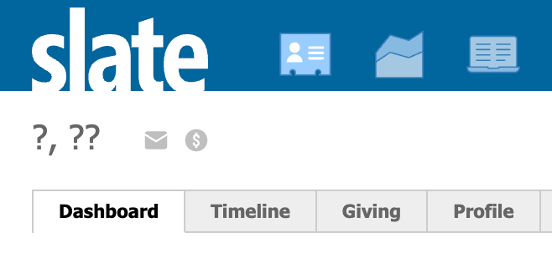
...then you might know that, by default, Slate cannot store characters outside the Latin alphabet. To be more specific, standard and custom system fields can only store letters A-Z, numbers, and some common punctuation marks and diacritics (like . and é). If you try to enter a different type of character (like 是), it will be replaced by a question mark.
This issue is related to character encoding, the method that computers use to store text information. Most Slate fields use Extended ASCII encoding, hence this limitation. If you've ever noticed that this limitation doesn't exist in places that accept HTML text (like Deliver, dashboards, and portals), it's because the underlying data type is XML, which allows Unicode encoding.
Once a character is replaced, it is impossible to get it back because it was never stored in your database - not even in the form response. This can be problematic if you interact with constituents whose languages do not use the Latin alphabet. Since forms do not indicate any issues and will appear to submit successfully, they may have no idea that something went wrong.
You can instruct constituents to romanize their name, school, or other information. Even so, they may not read directions, or their browser's autofill might make the decision for them. The best solution involves preventing these characters from being submitted at all.
To do this, add the following script to Edit Scripts or via a content block:
/* Adjust the error message inside the backtick (`) characters as needed.
   ${s} is blank for 1 error and "s" for multiple errors. */
const ERROR_MESSAGE = () => `Please adjust the highlighted field${s} to remove any non-Latin characters.`;

/* Exceptions are characters that don't normalize in JS but Slate can store.
   They have to use escapes here or the script itself won't save. */
const NORMALIZATION_EXCEPTIONS = /[\u00F8\u00D8\u0111\u0110\u0142\u0141\u0127\u0126\u0131\u0130\u00D0]/g;

function hasNonLatinCharacters(value) {
    const normalized = value
        .normalize('NFD')
        .replace(/[\u0300-\u036f]/g, '')
        .replace(NORMALIZATION_EXCEPTIONS, '');

    return /[^\x00-\x7F]/.test(normalized);
}

function validateCharacters() {
  $('.error').addClass('hidden');
  $('.form_question').removeClass('required');

  let errorCount = 0;
  $('.form_question:not([data-invisible="1"]):has(input,textarea)').each(function() {
    const question = $(this);
    question.find('input,textarea').each(function() {
      const val = $(this).val();
      if (val && hasNonLatinCharacters(val)) {
        question.addClass('required');
        errorCount++;
      }
    });
  });

  if (errorCount > 0) {
    window.s = errorCount == 1 ? '' : 's';
    $('.error').removeClass('hidden').text(ERROR_MESSAGE());
  }
  return (errorCount == 0);
}

$(document).ready(function() {
  $('button.form_button_submit').off().on('click', function(e) {
    if (!validateCharacters()) {
      e.preventDefault();
      e.stopImmediatePropagation();
      return false;
    }

    if (form.Validate()) FW.Lazy.Commit(this, { cmd: 'submit' });
    return false;
  });
});
With this script in place, if someone presses Submit with a non-Latin character entered on the form, it will scroll to the top, display an error message, and highlight the field(s) with non-Latin characters.
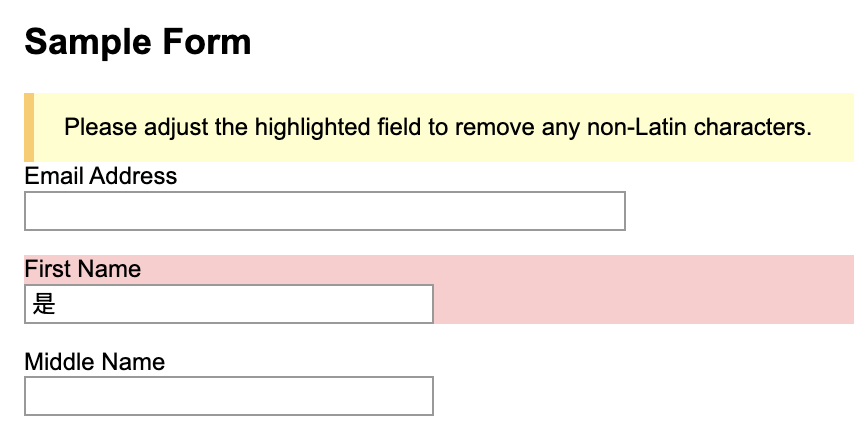
You can adjust the error text to your liking by editing this line of code (line 3 in the above code block):
const ERROR_MESSAGE = () => `Please adjust the highlighted field${s} to remove any non-Latin characters.`;
Note that ${s} is a variable that handles plurals: it will be blank if there is only one error, but becomes s if there are multiple errors.
How it Works
If you're wondering, here's a brief overview of how this script works:
- When the form loads, the "Submit" button's action get intercepted by the script. When "Submit" is clicked, every visible text field is checked using the hasNonLatinCharacters() function. If non-Latin characters exist, the fields are highlighted, the error is rendered, and submission is cancelled. Otherwise, form submission continues as normal.
- The hasNonLatinCharacters() function uses normalization, a process where compound characters (like
ñ) are split into their base letter and diacritic (likenand~). Then, all punctuation and diacritics are removed. If there's still a special character, it must be one that can't be represented using Latin letters. Note that there are some exceptions (likeø) that Slate can accept but otherwise get missed - so they're removed via the NORMALIZATION_EXCEPTIONS to prevent false positives.
A note for those comfortable editing JavaScript: the Edit Scripts interface suffers from the same issue as form fields. This means the script itself cannot contain any Unicode characters. That's why the NORMALIZATION_EXCEPTIONS regex uses escapes, even though it's harder to read.
No comments to display
No comments to display