
🎯Event Notes as Audience Targeting in Communications
Advanced Use of Event Notes Forms: Event Metadata and Audience Targeting
While Event Notes Forms are commonly used as an event evaluation and documentation tool, the data captured in Notes Forms can also be leveraged operationally. Because Notes Form fields are available through joins and exports, we’re going to show you how they can be used to drive communication targeting logic, in much the same way as the Upcoming School Visits work.
Step 1: Event Notes with Event Metadata
You can the Notes Form to store event-specific metadata that does not exist on the standard Event object, such as additional custom links. These values can be exposed in communications, exported in queries, and referenced elsewhere in Slate.
Advanced Use Case: Event Targeting Audience Matching
Instead of storing information merely for display, Notes fields can also describe the intended audience for an event.
In this model, the Event Notes Form becomes a lightweight targeting layer. Rather than hard-coding audience logic into a set of queries, event administrators can define audience criteria directly on the event itself.
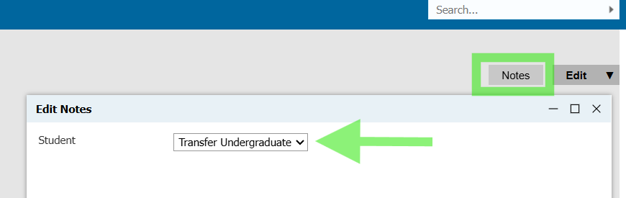
Examples include:
|
Notes Field |
Example Value |
|
Academic Program |
Biology |
|
Region |
PA |
|
Student Type |
Transfer |
|
Housing Interest |
On Campus |
We can then use this as targeting criteria in the deliver outreach queries, so that we can have a single dynamic deliver invite instead of an array of invites with custom filters on each. The recipient query uses independent subqueries to lookup the event and its associated Event Notes data, and compares the record's attributes against the targeting value saved to the event.
Depending on how you want to use it, these comparison operations (filters) may be built inside of subquery filters, inside of join subqueries, or on custom outer joins.
Example: Program-Based Event
An event contains a Notes field:
Ex. Target Program = Counseling
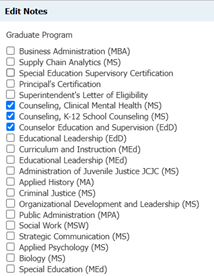
Then, in your query, you do: Person > Independent Subquery Join to Event > Event Notes
The query compares the student's program to the event's Target Program value. Only matching students receive communications about that specific event.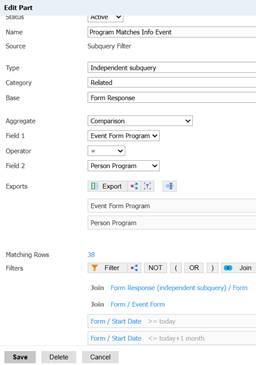
Example: Geographic Match
An event contains a custom location field: Target State = Texas; Target City = New York; Target County = Adams County PA; etc.
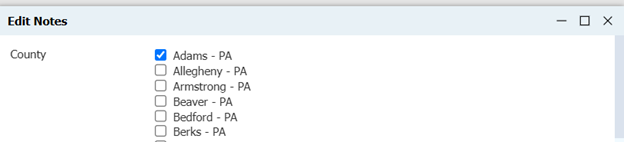
The event becomes associated with a geographic attribute without needing to build a separate event structure (folders, templates, etc.), and students are matched to only be invited for an individual event based on matching location attributes.
Functionally, this is similar to the Upcoming School Visit function and concept but expands it to allow for matching on whatever criteria you define - a configurable "Upcoming Event By X" framework, where X is any attribute you choose to store in the Event Notes form.
Outcome
The same Notes field can serve multiple purposes:
- Communication merge field
- Query filter
- Recipient selection criteria
- Portal display criteria
- Custom event categorization
In other words, the Notes Form becomes both:
- Event data
- Event logic
Further Reading
While this article focuses on audience matching and communication targeting, these Summit presentations demonstrate other ways Event Notes metadata can be leveraged operationally.
At Slate Summit 2025, Christina Sobh and Benjamin Costello demonstrated how Event Notes can serve as a metadata hub that powers portal functionality beyond standard event fields.
At Slate Summit 2026, Mara Marzocchi demonstrated how Event Notes can be used to reduce the number of event templates required by storing program- or audience-specific metadata on the event itself (very similar!)
No comments to display
No comments to display