
🚌CJ Upcoming School Visit: Rebuild from STL
A common request on the forums is how to replicate the faithful "upcoming visits by school" filters and exports that were part of Slate's deprecated STL library in the new Configurable Join (CJ) style.
Technolutions Recommended Subqueries
First, you may have found Christopher Kwan’s helpful reply in the forums over the years on the best way to rebuild the filter:
You could explore building out the Upcoming Visits Filter in Configurable Joins by doing the following.
Start building your query - I'm assuming that you'll be using either the Person or the Application Configurable Joins bases.You'll then want to join at the top to Schools, School by Rank, or School by Level of Study/Rank. From there you'll then want to join at the top to Organization.
Once you've done that you'll add in a Subquery Filter where you will join from Organization to Form by Location Record. You'll then want to filter for your folders and add in a range for Start Dates
This Subquery Filter will return all person records that are attending that school within the next month.
And this Subquery Filter approach is great! But it has a key limitation for export-heavy use cases. The Subquery Filter only determines whether a matching event exists. If you also want to export event attributes (Date, URL, User, Location, etc.), you must recreate that same logic in one or more Subquery Exports.
For many use cases, this approach can work, and your job is done. Just be sure to make sure that you do not have filter drift between each subquery export and filter:
An update to one export subquery MUST match the update to twin filter subqueries or exports, and vice versa.
Alternative: Single Source of Truth Join
An alternative approach to solve this is to instead build the join from Organization to Form by Location Record as a 1:1 Outer Join.
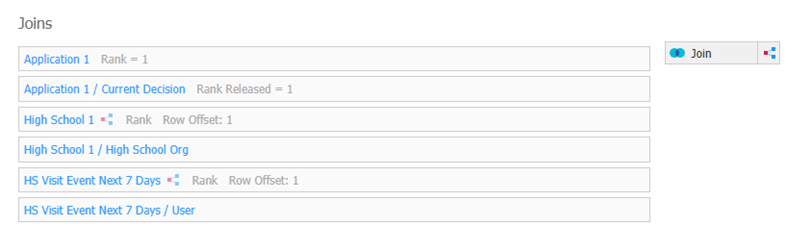
The primary advantage of the Outer Join pattern is that event selection logic exists in exactly one place. Folder restrictions, date ranges, and status filters live on the join itself. Recipient filtering can then be a simple "Event Exists" check, while exports can be added directly from the joined event record. This eliminates the possibility of drift between event-selection logic used for filtering and event-selection logic used for exports.
Building the Join
First, add the join from Organization to Form by Location record, as before:
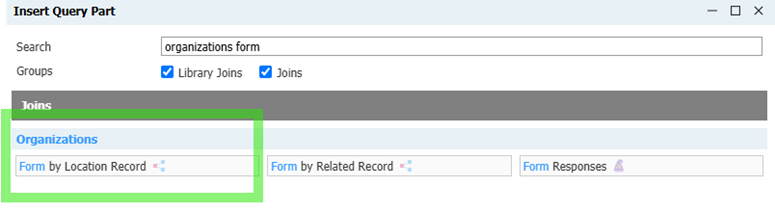
In this scenario, you will add the filter for your folders and range of start dates directly to the subquery join – just as above (Start Date Range Pair, Status = Confirmed, Folder)
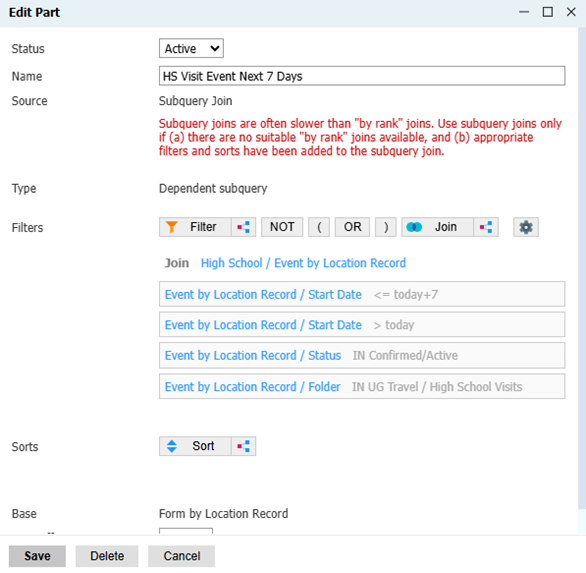
Filters
Then, your filter will be a simple “Event Exists” subquery.
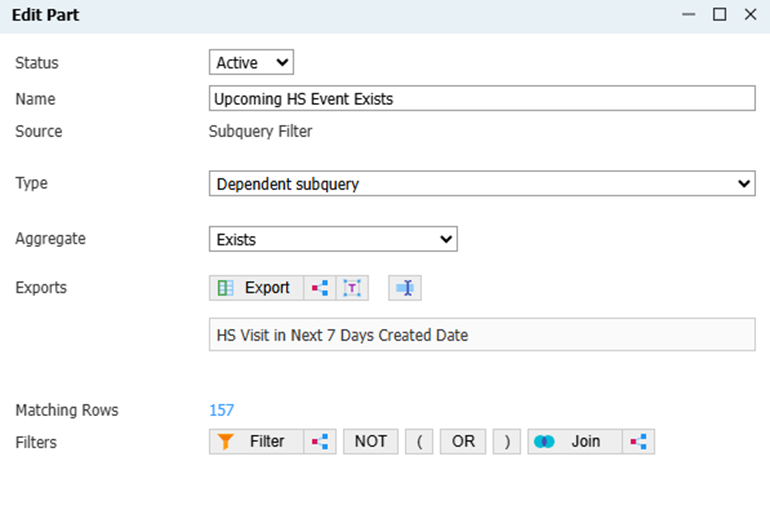
Important: If you need to change your filters from, for example, 7 Days Before to 1 Day Before variant, you must edit the start date filter inside of the subquery join. You only need to edit one start date filter – but it must be that one. Do not add an additional “filter”.
Exports
And, because it is an outer join, all of your event exports can be added as Direct Exports, just like the STL Upcoming School visit exports. This effectively recreates the "single event object" behavior that many legacy STL-based Upcoming School Visit communications relied upon.
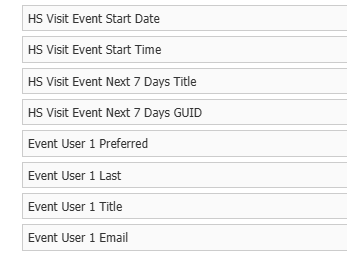
Additionally, you can now join to User 1/User 2 as an outer join, which allows you to add User-specific exports to merge in (such as merging in the sender email). Or, you can join to Form/Event Notes, and access fields and data saved there.
Limitations and Warnings
The limitation of the outer join – and the business process question you need to answer – is does your school ever visit a school more than once in the date-range you specified? This is a manufactured 1:1 join, so only one event will be displayed. In practice, this works if you can guarantee that a school will not have multiple qualifying visits within the date range (which is probably most schools).
If multiple events could qualify, Slate can only choose a single rank 1 record to join to. You can define Rank 1 in that case using Sorts on your Join Subquery.
Important: Before using the Outer Join pattern, confirm whether your institution ever schedules multiple visits to the same school during the selected date range. If so, a Subquery Export or dictionary-based approach may be more appropriate.
The other drawback is that there are filters that drastically affect your Recipient List that do not live in the conventional “Filters” section of the query – they live inside of the Form by Location subquery join. This is intentional and helpful – you will never have drift between your exports and filters. But, it breaks with the user's normal filter UX experience. This pattern can make query troubleshooting less intuitive because recipient-defining logic now exists inside the join itself, rather than in the Filters section of the query.
Why this approach?
By joining:
Person
→ School
→ Organization
→ Form by Location Record
the school-to-event relationship is resolved naturally through the join path.
This allows:
- A simple "Event Exists" filter.
- Direct exports from the joined event record.
- Direct joins to User 1 / User 2 and Form/Event Notes for additional exports.
- A single location for managing event folder and date-range logic.
Because event matching logic exists only once, there is no possibility of drift between filter logic and export logic.
No comments to display
No comments to display