
📝Using Notes Forms to Add Custom Merge Fields for Event Communications
While Form/Event Notes are commonly used for event evaluation and documentation, their fields are also available as merge fields in all Deliver Communications mailings. This creates an easy way to store static, event-specific metadata and use it in emails, text messages, and other event communications.
Event Metadata as Merge Fields
We recently needed to send students an event-specific URL after an online event concluded. Because the standard Event URL field was already being used and no existing Form/Event field was an appropriate fit, we added a field to the associated Form/Event Notes form instead.
Building and Connecting a Notes Form: Check the KB article (Form and Event Notes) for instructions on building the Notes form; we're focusing on how to apply Notes fields as custom merge fields in event communications here.
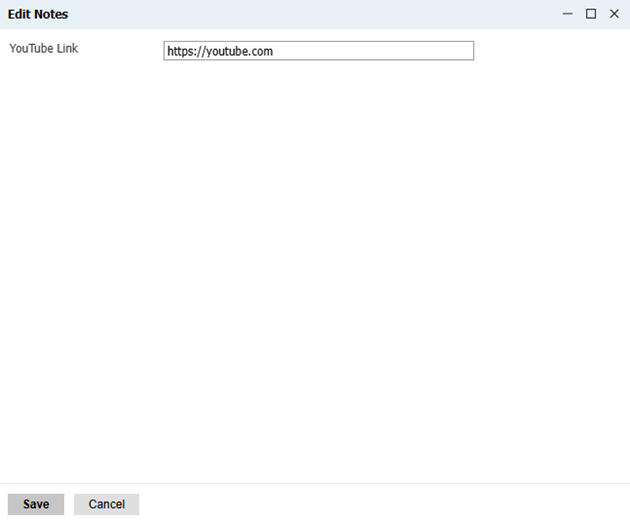
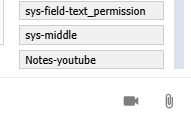
Every field on an associated “Notes” form is immediately available as a merge field on all Communications, without any fancy joins:
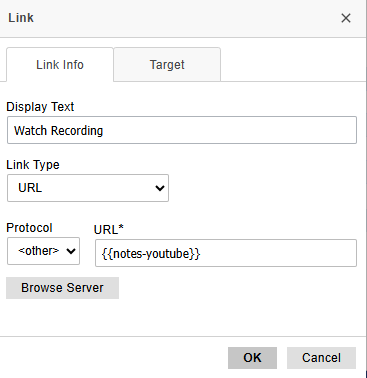
If you're merging in URLs, you will need to decide on a “rule” for building the link; I’d recommend including the "https://" URL prefix in the Notes Form input, and using “Other” in your link protocol to pull in the merge field:
And there you go!
Other Use Cases
Although this example uses a post-event URL, the same pattern can be used whenever you need a lightweight, event-specific field that is available in communications without needing additional joins, multiple event templates, or other custom configuration.
- Post-event recording URL
- Presentation deck URL
- Event-specific instructions
- Parking information
- Zoom follow-up link
Further Reading
Some of the inspiration for using Notes Fields as event metadata came from Christina Sobh and Benjamin Costello's 2025 Summit Presentation. Their use case passed over merge fields for communications and instead demonstrated additional ways Event Notes can be leveraged, using event metadata to power functionality beyond standard event fields.
Summit 2025 Sobh/Costello Download
Similarly, Mara Marzocchi’s Summit 2026 Presentation uses Event Notes to reduce the need for multiple event templates, showcasing another practical application of the same concept:
No comments to display
No comments to display