
🕰️Time After Event Starts Communications
If you’ve ever wanted to send messages to either attendees or no-shows after an event has started, at a fixed time, and have it setup in advance – then there is a trick you can use in Slate!
Right now, there is no “During Event / Time After Event Start” trigger (Feedback Request!) But, if you use Negative values in “Time before event”, it will use the “Start Time” as the reference, and, in combination with Conditions, will allow you to send targeted messages at a dynamic pre-built time "after event start”: during the event.
The Goal:
You may want to send communications to one of two groups of students at larger events
- Send to all attendees (maybe instructions to go somewhere, announcement about something special, etc.)
- Send to all not-yet-checked-in (could be late check in instructions, are you coming reminder, if you're here please check in, etc.)
The Solution:
Use the “Time before event” trigger, which references “Start Time”;
And then use a negative number to work forward from your start time.
A 9:00 AM start time would send this message around ~9:45 AM: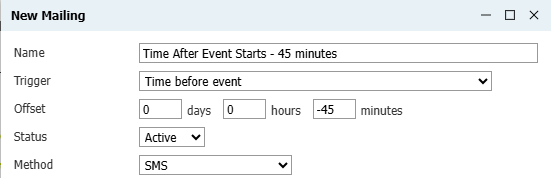
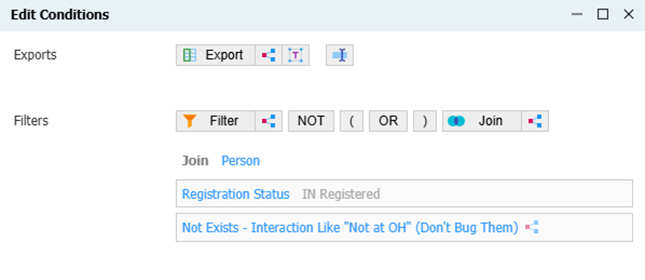
You then apply a Condition to send to “Status = Registered” (anyone not checked in) or “Status = Attendees”:
The Catch
Once built, you must remember: this is a hack of how this is trigger is built to work, and Slate gets confused. The offset fields for days and hours will display something funky: -1 days and -1 hours. If you entered -1 hour, it will display “-2 hours”; -2 turns into "-3 hours", etc.
Ignore the displayed offset: “-1 day, -3 hours”… this configuration would trigger at 2 hours, as you first built it!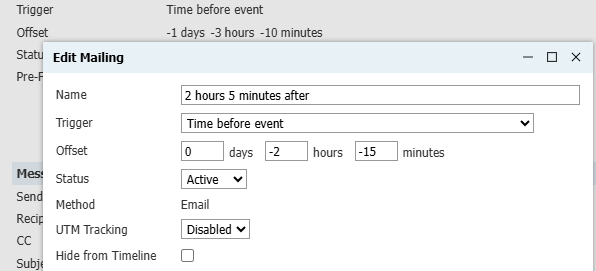
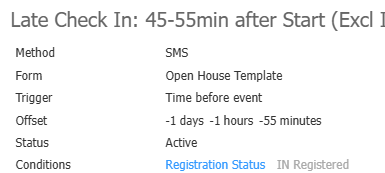
To edit your send time, you must first clear those two “changes” back to “0 days” and “0 hours” and then proceed to put in your edited negative time offset.
It Really Works
Here’s proof! This event started at 8:30 AM, and the message sent 48 minutes later, as you can see in the “Last Sent” record:
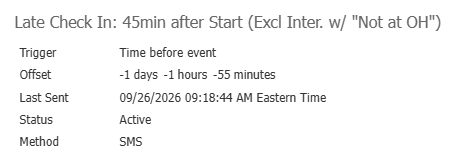
Warning: Because Slate queues up Event SMS before the actual send time to try and guarantee the message will send on time (that is, no late), your actual send window will often vary 5-10 minutes.
Other Solutions:
Currently, the only other way to solve this is using Deliver. You could pre-build an SMS or email before the event, and then, on the day of the event, trigger it send at a specific time about 55 minutes after the event starts.
However, this requires someone to remember to trigger it – you cannot pre-build the message in Deliver:
- If you use Deliver Send at Specific Time, the query will pull around midnight, so the "registered vs attendee" condition/filters cannot be applied accurately.
- If you use Deliver Send Windows, they may or may not line up well - plus, it is a window, so you cannot be certain if it actually fires at exactly 10/12/2.
No comments to display
No comments to display