
Application Status Not Showing on Tab
UPDATED: This behavior has changed thanks to Technolutions release of Slate's Application tab compression (see 2026 Slate Summit Executive Summary and The ReSolution > Updated Response section below.
Reported Issue
A partner institution noticed that their application tabs were displaying the application status on some of them, but not all. We confirmed this as well and inspected to find the reason why.
What We Found
By default, the Application Status field displays in lightweight text next to the bolded application round name/header in the administrative interface.
An example with one application:

Two applications:

Three applications:

Four applications:

Application tabs are ordered by Application Submission Date descending, then Application Creation Date descending, with the newest on the left.
Custom tab colors will always be displayed.
The ReSolution
🕒 Original Response (Archived)
We concluded that this is standard Slate behavior and not a defect or a setting that can be changed. There were no Technolutions Slate Knowledge Base articles confirming this, but we suspect it is to save visual space with the application status text only showing for the two leftmost application tabs.
🌟Updated Response
With Slate's new Application Tab Compression feature, application statuses now display for each tab. That article includes a great screenshot example of this functionality, and here is another: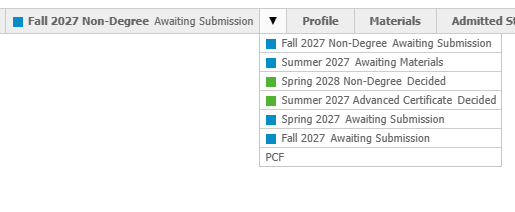
Additionally, after revisiting the legacy separated application tab experience, the original findings for application status text only showing on the two leftmost appears to no longer be the case. We are seeing two, three, and even four application tabs, although the behavior was not always consistent. While we still have not found documentation describing the exact display logic, testing leads us to believe that Slate dynamically adjusts what information is displayed based on available tab space, including factors such as the number of tabs a person record has along with the length of tab names.
For Slate schools still using separated application tabs, this may provide another reason to consider migrating to Application Tab Compression. See the Early Access Features and Configuration Keys Knowledge Base articles for more information and considerations.
No comments to display
No comments to display